

Estrategia Tech
SEO Técnico: Por qué tu web no aparece en Google
Tu web tiene buen diseño. Buen contenido. Hasta inviertes en publicidad. Pero cuando buscas tu negocio en Google, no apareces.
 Adrian Sobota
Tu web tiene buen diseño. Buen contenido. Hasta inviertes en publicidad. Pero cuando buscas tu negocio en Google, no apareces. O peor: apareces en la página 5, que es lo mismo que no existir.
El problema, en la gran mayoría de casos, no es tu contenido. Es el SEO técnico: la infraestructura invisible de tu web que permite (o impide) que Google la encuentre, la entienda y la muestre a quienes te buscan.
Si nunca has oído hablar del SEO técnico, o si lo has oído pero no sabes por dónde empezar, este artículo es para ti. Vamos a explicar qué es, cuáles son sus pilares fundamentales, y qué puedes hacer para que tu web deje de ser invisible. Sin humo, sin tecnicismos innecesarios, y con los pasos concretos que aplicamos cuando hacemos auditorías SEO para nuestros clientes.
Qué es el SEO Técnico y en Qué se Diferencia del SEO On Page
El SEO técnico es todo lo que haces para que los motores de búsqueda puedan acceder a tu web, entender su contenido y decidir si merece aparecer en los resultados. No tiene que ver con las palabras que escribes ni con los enlaces que consigues. Tiene que ver con cómo está construida tu web por dentro.
Piensa en ello así: si tu web fuera un restaurante, el SEO on page sería la carta, la decoración y el servicio (lo que el cliente ve). El SEO off page sería la reputación, las reseñas y el boca a boca. Y el SEO técnico sería la cocina, las instalaciones, la electricidad y la fontanería. Si la cocina no funciona, da igual lo bonita que sea la carta.
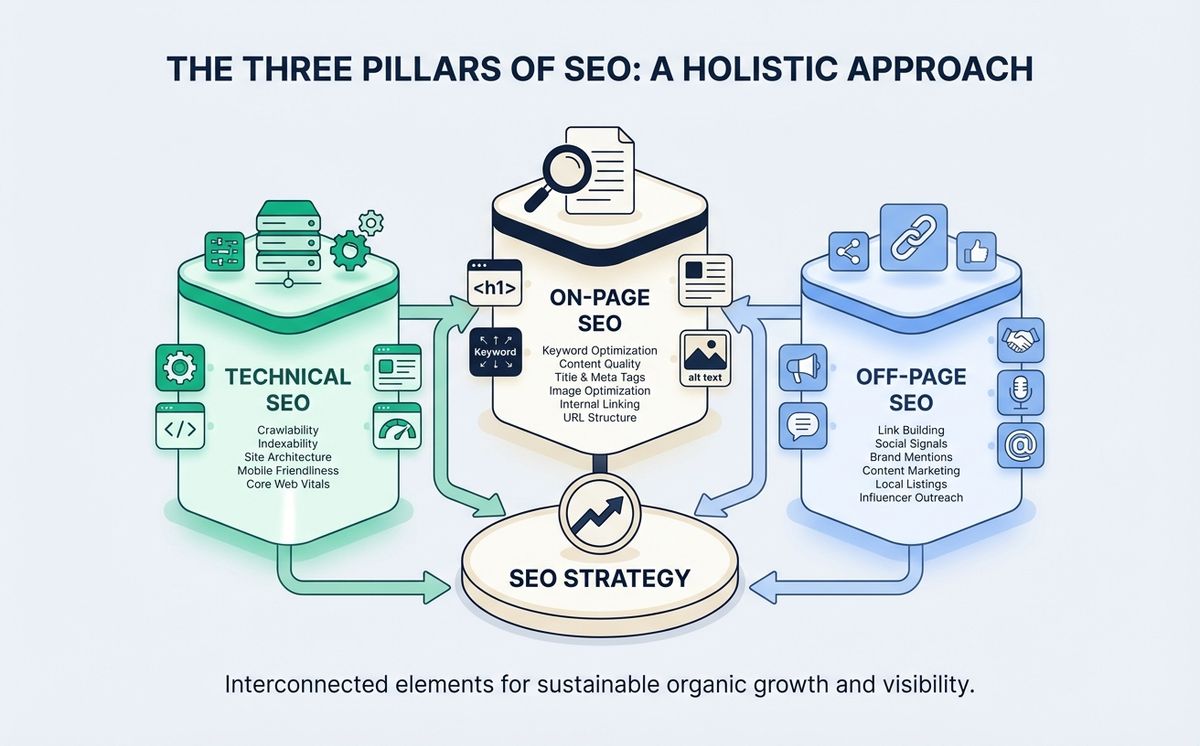
Google rastrea miles de millones de páginas cada día. Si tu web tiene problemas técnicos, Googlebot (el robot que rastrea internet) puede no encontrarla, no entenderla, o decidir que no merece ser indexada. Y si no estás en el índice de Google, no existes para las búsquedas.
Raquel, propietaria de una clínica veterinaria, nos contactó después de un año con su web online y cero tráfico orgánico. “Tenía 15 artículos sobre cuidado de mascotas, todos bien escritos. No entendía por qué Google me ignoraba.” Cuando revisamos su web, el problema era claro: el archivo robots.txt estaba bloqueando el acceso de Googlebot a todo el sitio. Literalmente le estaba diciendo a Google “no me rastrees”. Un problema de 5 minutos que le costó un año de invisibilidad.
Rastreo: Cómo Google Encuentra tu Web
El primer pilar del SEO técnico es el rastreo (crawling). Antes de que Google pueda mostrar tu web en los resultados, necesita encontrarla y leer su contenido. Esto lo hace Googlebot, que sigue enlaces de página en página como una araña recorriendo una red.
El archivo robots.txt
El archivo robots.txt es un documento de texto en la raíz de tu web que le dice a los rastreadores qué pueden y qué no pueden acceder. Es la primera cosa que Googlebot lee cuando visita tu dominio.
Un robots.txt mal configurado es uno de los errores más comunes y devastadores. Puede bloquear secciones enteras de tu web sin que lo sepas. La documentación oficial de Google sobre rastreo e indexación explica en detalle cómo configurarlo correctamente.
Qué verificar:
- Que no esté bloqueando páginas importantes (Disallow: /)
- Que apunte a tu sitemap XML
- Que permita el acceso a CSS y JavaScript (Google necesita renderizar tu página)
Sitemap XML
Un sitemap XML es un archivo que lista todas las URLs de tu web que quieres que Google indexe. Es como darle a Googlebot un mapa del sitio en lugar de dejarle que lo descubra solo.
No es obligatorio, pero es recomendable. Especialmente si tu web tiene muchas páginas, contenido nuevo frecuente, o una estructura de navegación compleja.
Qué verificar:
- Que exista y esté accesible en /sitemap.xml
- Que incluya solo URLs que quieres indexar (no 404s, no redirects)
- Que esté referenciado en tu robots.txt
- Que se actualice automáticamente cuando publicas contenido nuevo
Crawl Budget
Google no tiene recursos infinitos. Asigna un “presupuesto de rastreo” (crawl budget) a cada sitio. Si tu web tiene miles de páginas duplicadas, URLs rotas o contenido sin valor, Google gasta su presupuesto rastreando basura en lugar de tus páginas importantes.
Para pymes con webs de menos de 500 páginas, el crawl budget rara vez es un problema. Pero si usas WordPress con plugins que generan URLs de taxonomías, archivos de autor y páginas de adjuntos, puedes tener miles de URLs basura sin saberlo. Una auditoría SEO técnica detecta estos problemas de rastreo en menos de una hora. Es el primer paso para mejorar tu SEO técnico sin tocar una línea de contenido.
Indexación: Que Google te Incluya en sus Resultados
Que Google rastree tu web no significa que la indexe. El rastreo es el paso 1. La indexación es el paso 2: Google decide si tu contenido merece estar en su índice de búsqueda. Aquí es donde el SEO técnico se complementa con el SEO on page: la indexación depende tanto de la infraestructura técnica como de la calidad y estructura de tu contenido.
Canonical URL
La etiqueta canonical URL le dice a Google cuál es la versión “oficial” de una página cuando existen duplicados. Por ejemplo, si tu misma página se puede acceder por tudominio.com/producto y tudominio.com/producto?ref=email, necesitas una canonical que indique cuál es la original.
Sin canonicals, Google puede:
- Indexar la versión equivocada de tu página
- Diluir la autoridad entre duplicados
- Confundirse sobre qué página mostrar en resultados
Meta robots
Las etiquetas meta robots (noindex, nofollow) controlan qué páginas se indexan y qué enlaces se siguen. Si alguien puso un “noindex” en una página importante durante el desarrollo y se olvidó de quitarlo, esa página no aparecerá en Google jamás.
Es más común de lo que parece. Lo vemos en auditorías al menos una vez al mes.
Google Search Console
La herramienta gratuita de Google para verificar la indexación de tu web. Te dice exactamente qué páginas están indexadas, cuáles tienen errores, y cuáles han sido excluidas. Si no tienes Search Console configurada, estás volando a ciegas.
Si quieres entender cómo Google está cambiando con la inteligencia artificial y cómo eso afecta al SEO, tenemos un artículo completo sobre SEO e IA que complementa esta guía.
Core Web Vitals: Rendimiento y Experiencia de Usuario
Los Core Web Vitals son las métricas que Google usa para medir la experiencia de usuario de tu web. Desde 2021 son factor de ranking, y en 2026 son más importantes que nunca porque Google premia las webs rápidas tanto en resultados orgánicos como en AI Overviews.
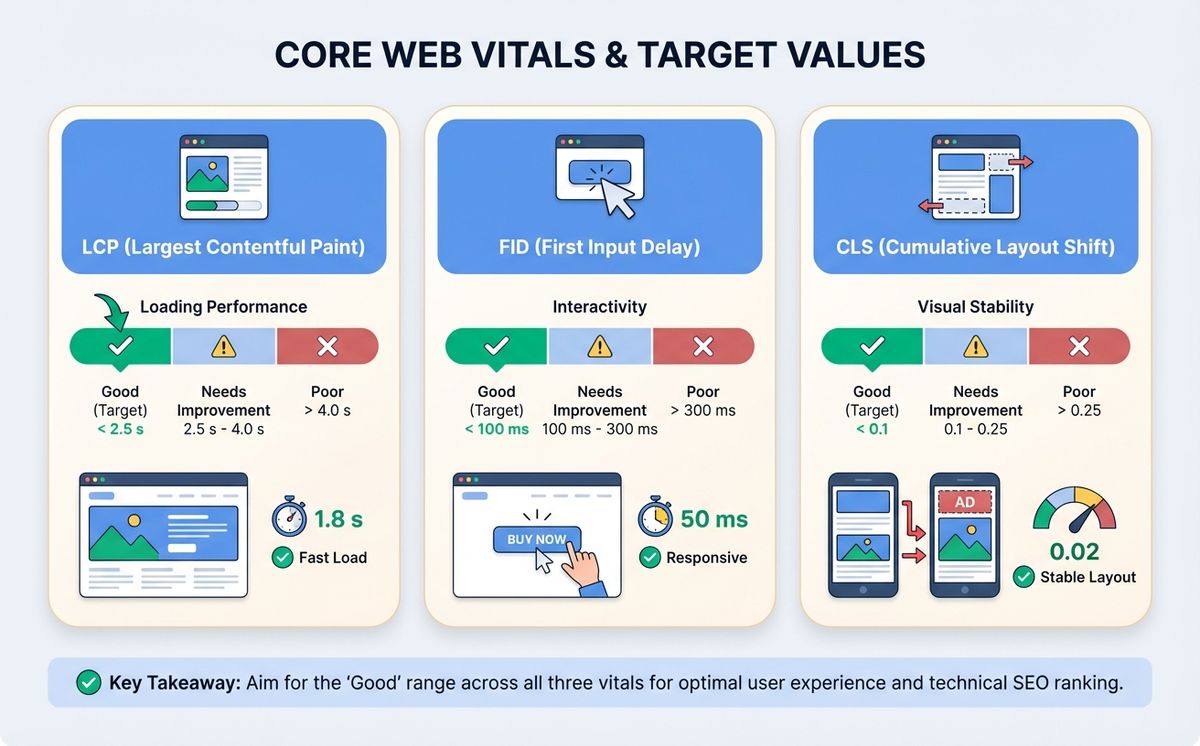
LCP (Largest Contentful Paint)
Mide cuánto tarda en cargar el elemento visual más grande de la página (normalmente la imagen principal o el bloque de texto más grande). El objetivo es menos de 2,5 segundos.
Cómo mejorarlo:
- Optimiza imágenes (WebP/AVIF, tamaños correctos)
- Usa lazy loading para imágenes fuera de la pantalla
- Minimiza CSS y JavaScript que bloquea el renderizado
- Usa un CDN (Content Delivery Network)
INP (Interaction to Next Paint)
Reemplazó al antiguo FID. Mide la velocidad de respuesta de tu web cuando el usuario interactúa (clic, toque, teclado). El objetivo es menos de 200 milisegundos.
Cómo mejorarlo:
- Minimiza el JavaScript de terceros
- Divide tareas largas en chunks más pequeños
- Prioriza la interactividad del contenido visible
CLS (Cumulative Layout Shift)
Mide los cambios de diseño inesperados mientras la página carga. Ese momento en que vas a hacer clic en un botón y el contenido se mueve porque se cargó un anuncio arriba. El objetivo es menos de 0,1.
Cómo mejorarlo:
- Define width y height en todas las imágenes
- Reserva espacio para anuncios y embeds
- Usa font-display: swap para fuentes personalizadas
La velocidad de carga importa más de lo que crees
La velocidad de carga web no es solo una métrica técnica. Según web.dev, cada segundo adicional de carga reduce las conversiones un 7%. Si tu web tarda 5 segundos en cargar en lugar de 2, estás perdiendo clientes todos los días.
Diego, director de una tienda online de material deportivo, vino a nosotros frustrado. “Invertimos 2.000 euros al mes en Google Ads, pero la tasa de rebote era del 75%.” Cuando medimos su web en PageSpeed Insights, el LCP era de 6,2 segundos. Los usuarios hacían clic en el anuncio, esperaban, y se iban. Después de optimizar imágenes, implementar lazy loading y mover a un hosting con CDN, el LCP bajó a 1,8 segundos. La tasa de rebote cayó al 42% y las ventas subieron un 35% sin cambiar ni un euro de inversión publicitaria.
Si tu web está construida con tecnología moderna como Next.js, estos problemas son mucho menos comunes. El framework renderiza en servidor, optimiza imágenes automáticamente y usa CDN global. Hablamos en detalle de esto en nuestra guía de cuánto cuesta desarrollar una web.
Arquitectura y Estructura de tu Web
Estructura de URLs
URLs limpias y descriptivas ayudan tanto a Google como a los usuarios. tudominio.com/servicios/desarrollo-web es mejor que tudominio.com/?page_id=247.
Buenas prácticas:
- Minúsculas, con guiones (no guiones bajos)
- Incluir la keyword cuando sea natural
- Cortas y descriptivas (3-5 palabras)
- Sin parámetros innecesarios
Jerarquía de headings
H1, H2, H3… no son solo tamaños de texto. Son la estructura semántica de tu contenido. Google los usa para entender la jerarquía de información: qué es importante, qué es secundario, qué es un detalle. Si tus headings no tienen orden lógico, Google no entiende tu página. Un H1 por página (el título), H2 para secciones principales, H3 para subsecciones.
Datos estructurados y Schema Markup
Los datos estructurados SEO son código JSON-LD que añades a tu web para que Google entienda el significado de tu contenido, no solo las palabras. Implementar datos estructurados es una de las tareas más rentables de SEO técnico porque el esfuerzo es mínimo y el impacto en visibilidad es inmediato. Le dices “esto es un artículo”, “esto es un producto con este precio”, “esto es una FAQ”.
Con datos estructurados puedes conseguir rich snippets en los resultados de Google: estrellas de valoración, precios, FAQs desplegables, breadcrumbs. Más visibilidad = más clics.
Seguridad: HTTPS
Si tu web todavía usa HTTP en lugar de HTTPS, Google la marca como “no segura” y la penaliza en rankings. Un certificado SSL es gratuito (Let’s Encrypt) y la mayoría de hostings lo instalan con un clic. No hay excusa para no tenerlo. Además, HTTPS mejora la velocidad de carga web gracias al protocolo HTTP/2, que solo funciona sobre conexiones seguras. Esto impacta directamente en tus Core Web Vitals y, por tanto, en tu posicionamiento.
Checklist de SEO Técnico para tu Web
Usa esta lista para verificar los fundamentales:
- robots.txt accesible y sin bloqueos incorrectos
- Sitemap XML presente, actualizado y enviado a Search Console
- Google Search Console configurada y verificada
- HTTPS activo con certificado SSL válido
- LCP inferior a 2,5 segundos
- INP inferior a 200 milisegundos
- CLS inferior a 0,1
- Mobile-first: web funcional y rápida en móvil
- URLs canónicas configuradas para evitar duplicados
- Sin páginas con noindex que deberían estar indexadas
- Sin errores 404 en páginas importantes
- Datos estructurados (JSON-LD) implementados
- Headings con jerarquía correcta (H1 > H2 > H3)
- Imágenes optimizadas con alt text descriptivo
- Velocidad de carga verificada en PageSpeed Insights
Si respondes “no” a tres o más puntos, tu web necesita atención. Si quieres hacer un diagnóstico completo con herramientas gratuitas, tenemos una guía para detectar problemas de SEO antes de gastarte un euro. Y si prefieres que lo haga un equipo profesional, en LetBrand hacemos auditorías SEO técnicas por 200 euros que cubren todos estos puntos y más.
SEO Técnico en la Era de la IA
En 2026, el SEO técnico no es solo para Google. Los modelos de IA (ChatGPT, Perplexity, Gemini) también rastrean webs para generar respuestas. Y tienen los mismos requisitos técnicos: necesitan poder acceder a tu contenido, entender su estructura, y encontrar datos verificables.
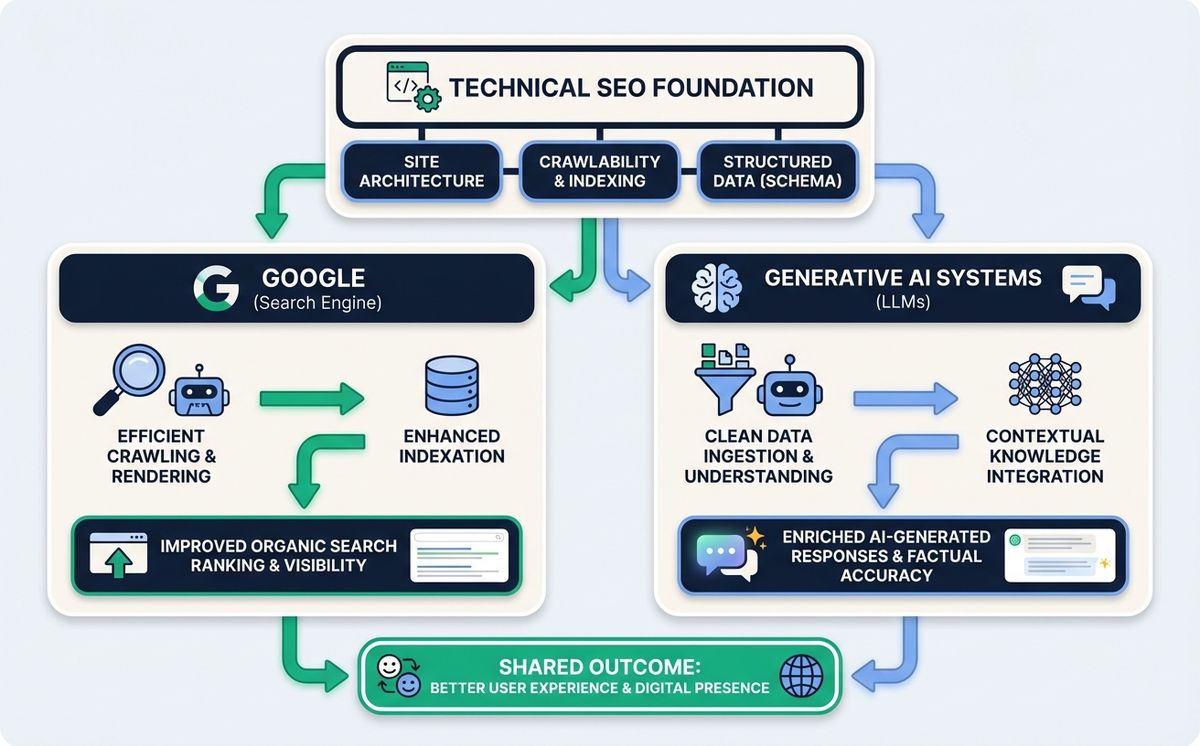
Los datos estructurados son especialmente importantes para la IA. Un modelo de lenguaje que encuentra tu contenido bien marcado con JSON-LD tiene mucha más probabilidad de citarte como fuente en sus respuestas. Es la diferencia entre que la IA diga “según fuentes especializadas…” y que diga “según LetBrand…”.
Si quieres profundizar en cómo la IA está cambiando las reglas del SEO, lee nuestro artículo sobre SEO e inteligencia artificial.
El SEO Técnico es la Base. Todo lo Demás se Construye Encima
Recapitulemos lo fundamental:
- El SEO técnico es la infraestructura invisible que permite a Google encontrar, entender y mostrar tu web
- Rastreo (robots.txt, sitemap XML) es el primer paso: que Google pueda acceder
- Indexación (configurar cada canonical URL, meta robots, Search Console) es el segundo paso: que Google decida incluirte. Sin indexación correcta, todo tu SEO on page es invisible
- Core Web Vitals (LCP, INP, CLS) miden la experiencia de usuario y afectan directamente al ranking
- Datos estructurados te dan visibilidad extra en resultados y te hacen citable por IA
- La velocidad de carga afecta conversiones, SEO y experiencia de usuario
Puedes escribir el mejor contenido del mundo. Si el SEO técnico de tu web falla, ese contenido es invisible. Es como tener el mejor producto en una tienda sin puerta.
La buena noticia: la mayoría de problemas de SEO técnico son solucionables. Muchos en cuestión de horas. El primer paso es saber dónde están.
Cada día que tu web tiene problemas técnicos es un día que pierdes clientes que te están buscando pero no te encuentran.
¿Quieres saber exactamente qué problemas técnicos tiene tu web y cómo arreglarlos? Reserva una auditoría SEO. 200 euros, sin compromiso. Te damos un informe con cada problema, su impacto, y los pasos exactos para solucionarlo. Si no encontramos nada que mejorar, te devolvemos el dinero.
Artículos Relacionados

Las skills para agentes son el estándar abierto que funciona con Claude Code, Copilot, Gemini CLI y 45+ agentes de IA. Un archivo. Todas las herramientas.
Leer más
Cada fin de semana de partido, Cloudflare bloqueado en España tumba tiendas online, pagos y apps. Los piratas ven el partido. Tu negocio paga la factura.
Leer másListo para empezar tu proyecto?
Hablemos de cómo podemos ayudar a tu marca a crecer con una estrategia digital personalizada.
Contáctanos