

Estrategia Tech
Como saber si tu web tiene problemas de SEO antes de gastarte un euro
Contratas a alguien para "mejorar tu SEO". Te cobra 500 euros al mes. Pasan tres meses y el tráfico no sube. Te dice que "el SEO lleva tiempo".
 Adrian Sobota
Contratas a alguien para “mejorar tu SEO”. Te cobra 500 euros al mes. Pasan tres meses y el tráfico no sube. Te dice que “el SEO lleva tiempo”. Pasan seis meses. Nada. Te das cuenta de que nunca te explicaron qué problemas tenía tu web ni qué estaban arreglando.
Esto pasa más de lo que crees. Y se evita con algo simple: saber hacer una auditoría SEO básica antes de contratar a nadie. No necesitas ser experto. No necesitas herramientas de pago. Solo necesitas 30 minutos y las herramientas gratuitas que Google pone a tu disposición.
En este artículo te enseñamos a diagnosticar los problemas de SEO de tu web tú mismo, con herramientas SEO gratis que cualquiera puede usar. Si después quieres una revisión profesional, perfecto. Pero al menos sabrás qué preguntar y cómo evaluar lo que te proponen.
Qué es una Auditoría SEO y por Qué la Necesitas
Una auditoría SEO es un diagnóstico completo del estado de tu web frente a los motores de búsqueda. Revisa la parte técnica (¿puede Google acceder?), el contenido (¿es relevante?), la autoridad (¿otros sitios confían en ti?) y la experiencia de usuario (¿carga rápido? ¿funciona en móvil?).
No es un checklist genérico. Es un análisis priorizado: no todos los problemas son iguales. Un error de indexación en tu página de servicios principal es crítico. El mismo error en un post de hace dos años que nadie visita es irrelevante.
Si tu web lleva más de 6 meses online y nunca le han hecho una auditoría web, casi seguro que tiene problemas que no ves. Algunos pueden estar costándote clientes todos los días.
Andrés, dueño de una academia de idiomas online, llevaba un año invirtiendo en contenido. “Publicábamos dos artículos a la semana. Buen contenido, bien escrito. Pero el tráfico orgánico estaba estancado en 200 visitas al mes.” Cuando revisamos su web con las herramientas que te vamos a enseñar aquí, encontramos que el 60% de sus páginas estaban excluidas del índice de Google por un problema con las etiquetas canonical. Sesenta artículos que Google no podía ver. Lo arreglamos en una tarde y el tráfico se duplicó en 6 semanas.
Si quieres entender en profundidad qué es el SEO técnico y cómo funciona, tenemos una guía completa de SEO técnico que cubre cada pilar.
Paso 1: Google Search Console (lo Primero y lo Más Importante)
Si solo vas a usar una herramienta, que sea esta. Google Search Console es la herramienta gratuita de Google que te dice exactamente cómo ve tu web el buscador. Es lo primero que abrimos en cualquier análisis SEO web que hacemos.
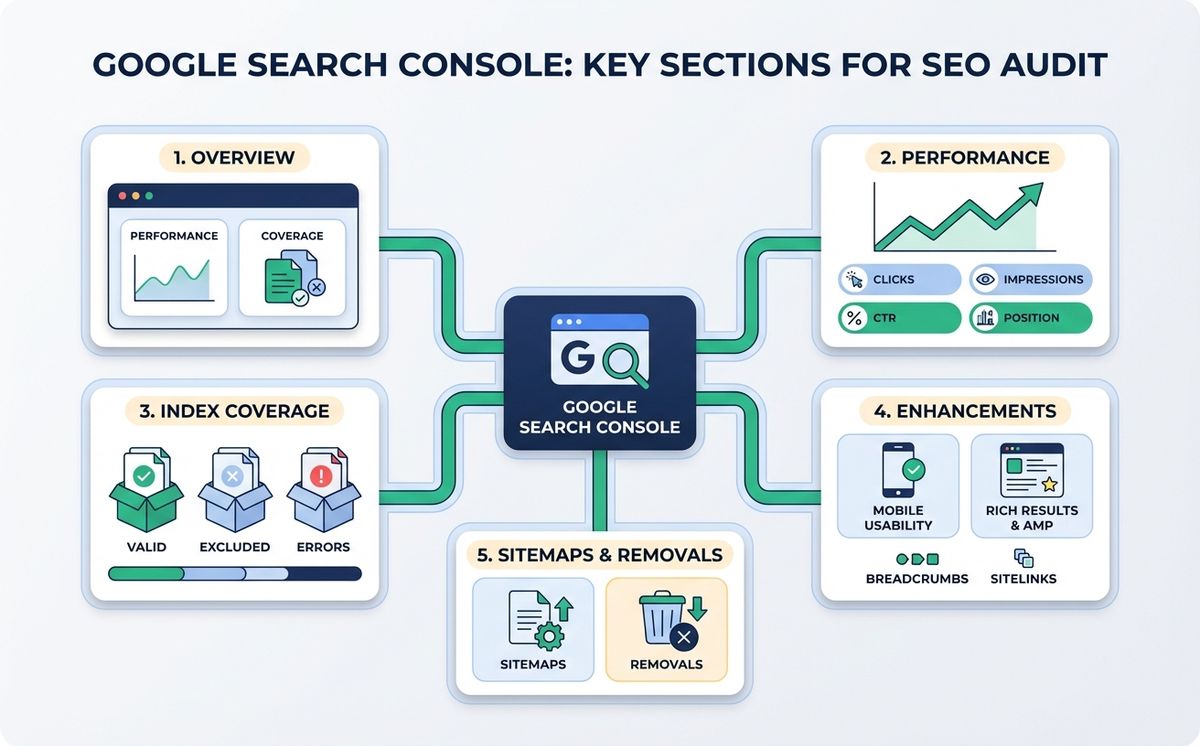
Qué revisar en Search Console:
- Cobertura/Indexación: ¿Cuántas páginas tiene Google indexadas? ¿Hay páginas excluidas que deberían estar indexadas? ¿Hay errores de rastreo?
- Rendimiento: ¿Para qué palabras clave apareces? ¿Cuántos clics recibes? ¿En qué posición media estás?
- Experiencia de página: ¿Pasas los Core Web Vitals? ¿Tu web es mobile-friendly?
- Sitemaps: ¿Tienes un sitemap enviado y procesado sin errores?
- Inspección de URLs: Puedes verificar si una página concreta está indexada y si tiene problemas
Señales de alarma que deberías investigar:
- Páginas “excluidas” con motivos como “Rastreada, actualmente no indexada” o “Página con redireccionamiento”
- Menos páginas indexadas de las que tu web tiene publicadas
- Errores 404 en páginas que deberían existir
- Core Web Vitals en rojo o naranja
- Impresiones altas con clics bajos (tu título y descripción no convencen)
Si no tienes Search Console configurada, hazlo ahora. Es gratis y tarda 10 minutos. Sin ella, estás haciendo SEO a ciegas.
Paso 2: PageSpeed Insights (Velocidad y Core Web Vitals)
PageSpeed Insights es otra herramienta gratuita de Google que analiza el rendimiento de cualquier página. Solo necesitas introducir la URL.
Qué te dice:
- Puntuación de rendimiento (0-100): Por encima de 90 es excelente. Por debajo de 50 es un problema serio.
- Core Web Vitals reales (datos de campo): LCP, INP, CLS con datos de usuarios reales
- Diagnósticos: Qué está ralentizando tu web (imágenes sin optimizar, JavaScript bloqueante, falta de caché)
- Oportunidades: Cuánto puedes mejorar y cómo
Qué buscar en una auditoría:
- LCP superior a 2,5 segundos (tu web carga lento)
- CLS superior a 0,1 (tu contenido “salta” al cargar)
- Puntuación móvil inferior a 50 (problemático)
- Imágenes sin formato moderno (WebP/AVIF)
- JavaScript de terceros que bloquea la carga
Patricia, propietaria de una tienda online de productos ecológicos, tenía una puntuación de PageSpeed de 23 en móvil. “No entendía por qué mis anuncios de Google Ads tenían un coste por clic tan alto.” Resulta que Google penaliza la experiencia de usuario mala también en Ads. Después de optimizar imágenes y eliminar 4 plugins de WordPress que no usaba, la puntuación subió a 78. Su coste por clic bajó un 22%.
Paso 3: Inspección Manual de Elementos Clave
Las herramientas automatizadas son útiles, pero hay cosas que necesitas verificar manualmente. Abre tu web y comprueba:
Etiquetas meta (título y descripción)
Haz clic derecho en cualquier página, “Ver código fuente”, y busca las etiquetas <title> y <meta name="description">. Verifica:
- Que cada página tenga un título único (no el mismo en todas)
- Que el título incluya la keyword principal y tenga entre 50-60 caracteres
- Que la meta description tenga entre 150-160 caracteres y sea persuasiva
- Que no haya páginas sin título o con títulos genéricos como “Home” o “Página 1”
Estructura de headings
Busca los H1, H2, H3 en el código. Cada página debería tener un solo H1 (el título), y los demás headings deberían seguir una jerarquía lógica. Si tienes 3 H1 en una página, o si saltas de H1 a H3 sin H2, es un problema de estructura.
HTTPS y certificado SSL
Tu web debe cargar por HTTPS (candado verde en el navegador). Si todavía usa HTTP, tienes un problema de seguridad que Google penaliza activamente.
Mobile-friendly
Abre tu web desde el móvil. ¿Se ve bien? ¿Los botones se pueden pulsar? ¿El texto se lee sin hacer zoom? Más del 60% del tráfico viene de móvil. Si tu web no funciona bien en un teléfono, estás perdiendo a más de la mitad de tus potenciales clientes.
Paso 4: Herramientas SEO Gratuitas que Complementan
Además de las herramientas de Google, hay varias herramientas SEO gratis que te ayudan a profundizar:
- Ahrefs Webmaster Tools (gratis): Auditoría técnica completa, similar a las herramientas de pago pero gratuita para tu propio sitio
- Screaming Frog (gratis hasta 500 URLs): Rastrea tu web como lo hace Google y detecta errores técnicos, links rotos, redirecciones, meta tags duplicadas
- Rich Results Test (Google): Verifica si tus datos estructurados están correctos
- Mobile-Friendly Test (Google): Comprueba si tu web pasa el test de usabilidad móvil
- GTmetrix: Análisis de rendimiento alternativo a PageSpeed con métricas adicionales
Para un análisis SEO web rápido con Screaming Frog, introduce tu URL y espera a que termine el rastreo. Revisa la pestaña de “Response Codes” para encontrar errores 404, la pestaña de “Page Titles” para detectar duplicados, y “Meta Description” para ver qué páginas la tienen vacía. En 10 minutos tendrás un mapa completo de los problemas técnicos de tu web.
Con estas herramientas puedes hacer una auditoría SEO online y una auditoría SEO gratis bastante completa sin gastar un euro. No va a ser tan profunda como una auditoría profesional, pero te dará una imagen clara de los problemas principales.
Paso 5: Los 10 Problemas de SEO Más Comunes (y Cómo Detectarlos)
Después de auditar webs de pymes durante años, estos son los errores que encontramos con más frecuencia:
- Páginas no indexadas sin motivo aparente: Search Console > Indexación. Si ves muchas páginas excluidas, investiga por qué.
- Velocidad de carga lenta: PageSpeed < 50 en móvil. Casi siempre por imágenes pesadas o demasiados plugins.
- Sin sitemap XML: Google no tiene un mapa de tu web. Créalo y envíalo desde Search Console.
- Títulos y descripciones duplicados: Screaming Frog lo detecta inmediatamente. Cada página necesita meta tags únicos.
- Sin HTTPS: Problema de seguridad + penalización de Google. Certificado SSL gratuito con Let’s Encrypt.
- robots.txt bloqueando contenido importante: Comprueba en la documentación de Google sobre rastreo e indexación que no bloquees páginas que quieres indexar.
- Contenido duplicado sin canonical: Dos URLs mostrando el mismo contenido. Google no sabe cuál elegir.
- Sin datos estructurados: Te pierdes los rich snippets en Google (estrellas, FAQs, breadcrumbs).
- Errores 404 en páginas internas: Links internos apuntando a páginas que ya no existen. Screaming Frog los encuentra todos.
- Web no responsive en móvil: Google usa mobile-first indexing. Si tu web no funciona en móvil, no rankeas.
Cuánto Cuesta una Auditoría SEO Profesional
Si después de hacer tu propio diagnóstico quieres una revisión más profunda, esto es lo que cuesta en España. El precio de una auditoría SEO varía según la profundidad:
- Auditoría básica (solo técnica): 150-300 euros
- Auditoría completa (técnica + contenido + autoridad + plan de acción): 300-1.000 euros
- Auditoría enterprise (sitios grandes, múltiples idiomas): 1.000-5.000 euros
El precio de una auditoría SEO debería incluir un informe con problemas detectados, priorizados por impacto, y un plan de acción con pasos concretos. Si alguien te vende una “auditoría” que es un PDF genérico de 3 páginas, no es una auditoría.
En LetBrand hacemos auditorías SEO completas por 200 euros. Incluyen revisión técnica, de contenido y de autoridad, con un informe priorizado y plan de acción. Puedes ver los detalles en nuestra página de precios.
Si estás pensando en invertir en una web nueva y quieres que se haga con SEO desde el día uno, echa un vistazo a nuestra guía de cuánto cuesta una página web. Un sitio bien construido desde el principio necesita menos auditorías después.
Cómo Saber si tu SEO Funciona (y Cuándo Preocuparte)
Después de arreglar los problemas, ¿cómo sabes si va bien? En la era de la IA, el SEO ha cambiado. Te recomendamos leer nuestro artículo sobre cómo funciona el SEO con inteligencia artificial para entender las reglas actuales.
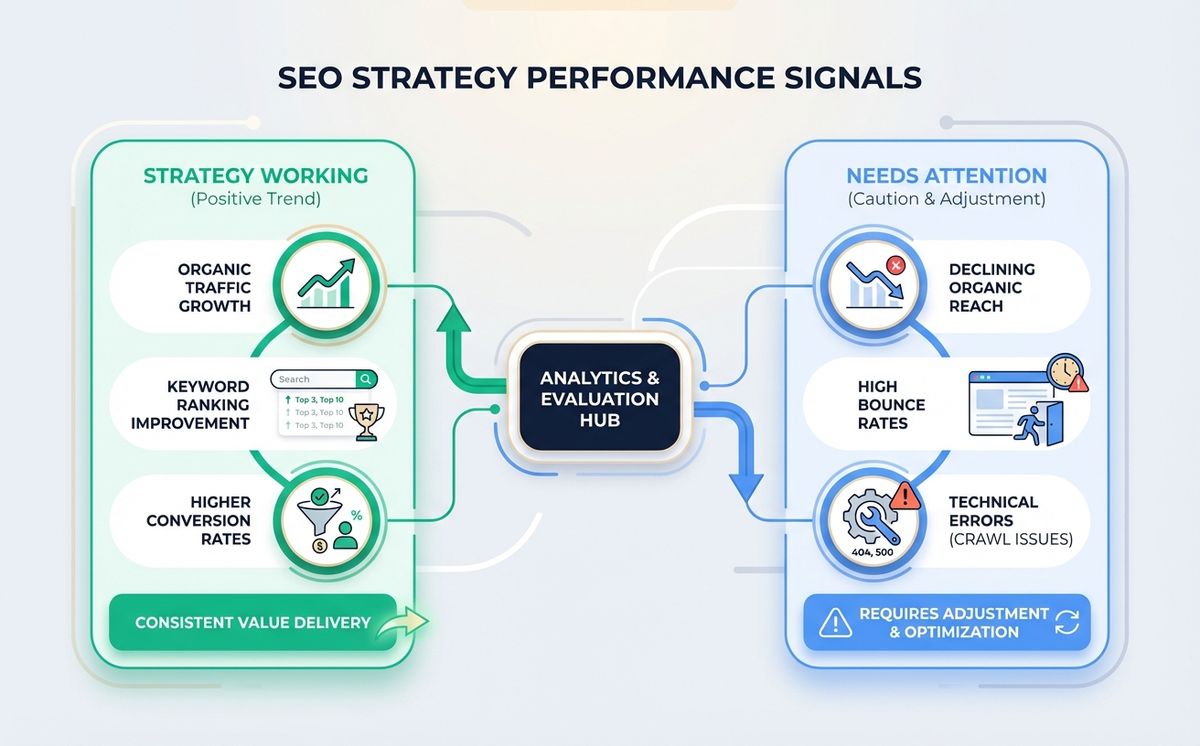
Señales de que va bien:
- Impresiones en Search Console creciendo mes a mes
- Posiciones medias bajando (más cerca de la primera página)
- Tráfico orgánico creciendo en Google Analytics
- Más páginas indexadas sin errores
- Core Web Vitals en verde
Señales de alarma:
- Tráfico orgánico cayendo sin cambios en tu web (posible problema algorítmico)
- Páginas desindexándose sin motivo
- Core Web Vitals empeorando
- Posiciones subiendo (alejándose de página 1)
- Menos impresiones mes a mes
Elena, cofundadora de una plataforma de formación online, revisaba Search Console cada lunes. “El dato que más me importa es la tendencia de impresiones. Si baja dos semanas seguidas, investigo. Así pillamos un problema de canonical antes de que se convirtiera en catástrofe.”
Tu Web Merece que Alguien la Mire por Dentro
Recapitulemos lo que puedes hacer hoy, gratis:
- Google Search Console te dice cómo ve Google tu web: indexación, errores, rendimiento
- PageSpeed Insights te dice si tu web es rápida o si está perdiendo clientes por lentitud
- Inspección manual de meta tags, headings, HTTPS y mobile-friendly
- Herramientas gratuitas como Ahrefs Webmaster Tools y Screaming Frog completan el diagnóstico
- Los 10 problemas más comunes se detectan con estas herramientas en menos de una hora
Si estás construyendo un producto digital desde cero, asegúrate de que el SEO está integrado desde el principio. Nuestra guía para crear un SaaS desde cero explica cómo hacerlo paso a paso, incluyendo la parte técnica que afecta al posicionamiento.
Una auditoría SEO no es un lujo. Es mantenimiento básico. Igual que llevas el coche al taller una vez al año, tu web necesita que alguien la revise por dentro al menos cada 6 meses.
Lo bueno: ahora sabes cómo hacer un primer diagnóstico tú mismo. Lo malo: si encuentras problemas que no sabes arreglar, necesitas ayuda.
¿Quieres un diagnóstico profesional de verdad? Nuestra auditoría SEO de 200 euros cubre todo lo que hemos explicado aquí y más: análisis técnico completo, revisión de contenido, perfil de autoridad, y un plan de acción priorizado. Reserva la tuya.
Artículos Relacionados

Las skills para agentes son el estándar abierto que funciona con Claude Code, Copilot, Gemini CLI y 45+ agentes de IA. Un archivo. Todas las herramientas.
Leer más
Cada fin de semana de partido, Cloudflare bloqueado en España tumba tiendas online, pagos y apps. Los piratas ven el partido. Tu negocio paga la factura.
Leer másListo para empezar tu proyecto?
Hablemos de cómo podemos ayudar a tu marca a crecer con una estrategia digital personalizada.
Contáctanos