

AI Solutions
AI Agent Skills: The Open Standard for Smarter AI Agents
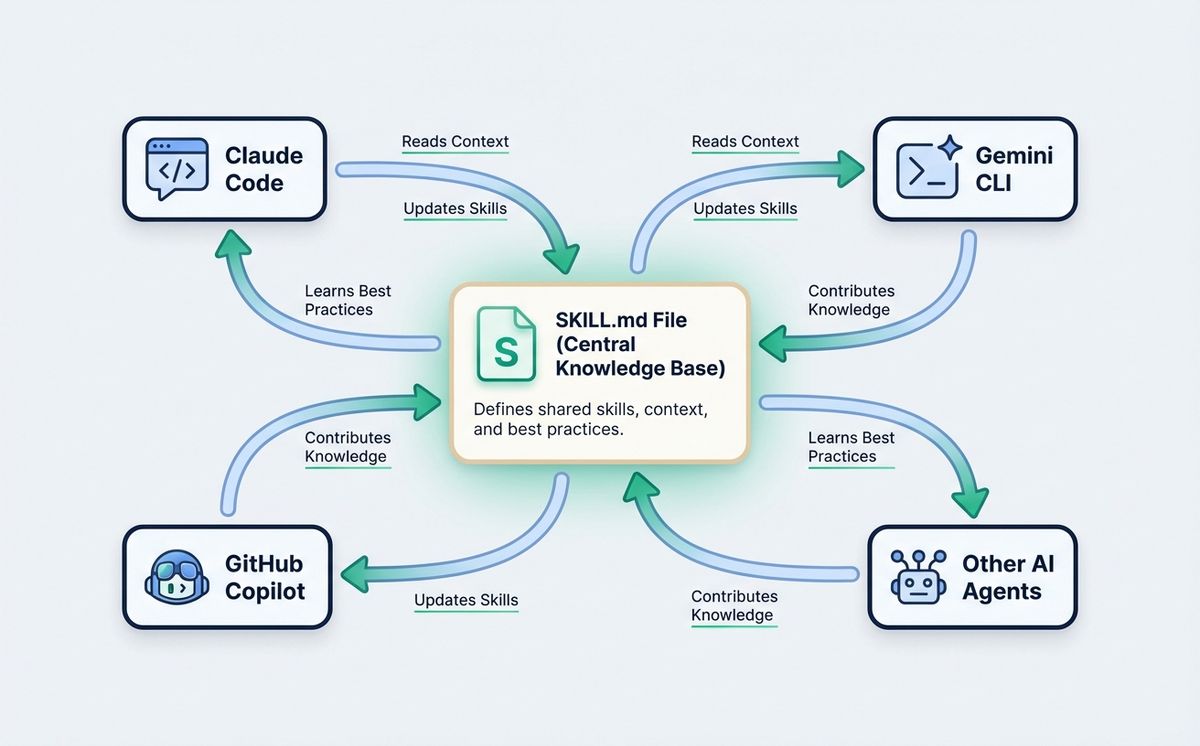
Agent skills are the open standard that works across Claude Code, GitHub Copilot, Gemini CLI, and 45+ AI agents. One file. Every tool. Zero repetition.
 Adrian Sobota
Three developers on the same team. One uses Claude Code, another uses Cursor with GitHub Copilot, the third uses Gemini CLI — and none of them has set up agent skills yet. Every morning, each starts their session doing the same thing: explaining the design system tokens, the API response format, the error message tone, the code review standards the team agreed on six months ago.
Fifteen minutes per developer. Per session. Every day. Multiplied by four or five sessions each.
The problem is not the tools. It’s that AI agents have no memory between sessions. Every time a new session starts, your team pays the setup cost again. And when three people use three different tools, that cost multiplies by three.
Agent skills solve this — not just for Claude Code, but for all 45+ agents that support the open SKILL.md standard: GitHub Copilot, Gemini CLI, Codex, Cursor, Windsurf, OpenCode, and dozens more. One file. Every tool. Zero repetition.
This isn’t a Claude-specific feature. It’s an open standard that the entire AI development ecosystem has converged on, and understanding it changes how teams think about working with AI agents.
What Are Agent Skills
An agent skill is a folder with a central file called SKILL.md. That file has two parts: a metadata block (name and description of the skill) and the actual skill content — instructions the agent follows when it activates the skill.
The most basic structure looks like this:
.claude/skills/brand-voice/
├── SKILL.md          ← central file (required)
├── examples/         ← reference posts (optional)
└── style-rules.md    ← additional guidelines (optional)
And the SKILL.md inside might be:
name: brand-voice
description: Apply brand voice when writing content: posts, headlines, copy, newsletters. Use this skill for any writing task.
Brand Voice
- Direct tone, never corporate. Talk like a person, not a press release.
- No unnecessary technical jargon.
- First person plural: “we do”, “we believe”.
- Short sentences. Paragraphs of three lines maximum.
Forbidden Words
quite, essentially, it’s worth noting, in today’s world, in conclusion.
The agent reads the descriptions of all available skills at the start of each session. When it detects that a task matches a skill’s description, it loads the full content automatically. No manual activation. No remembering it exists.
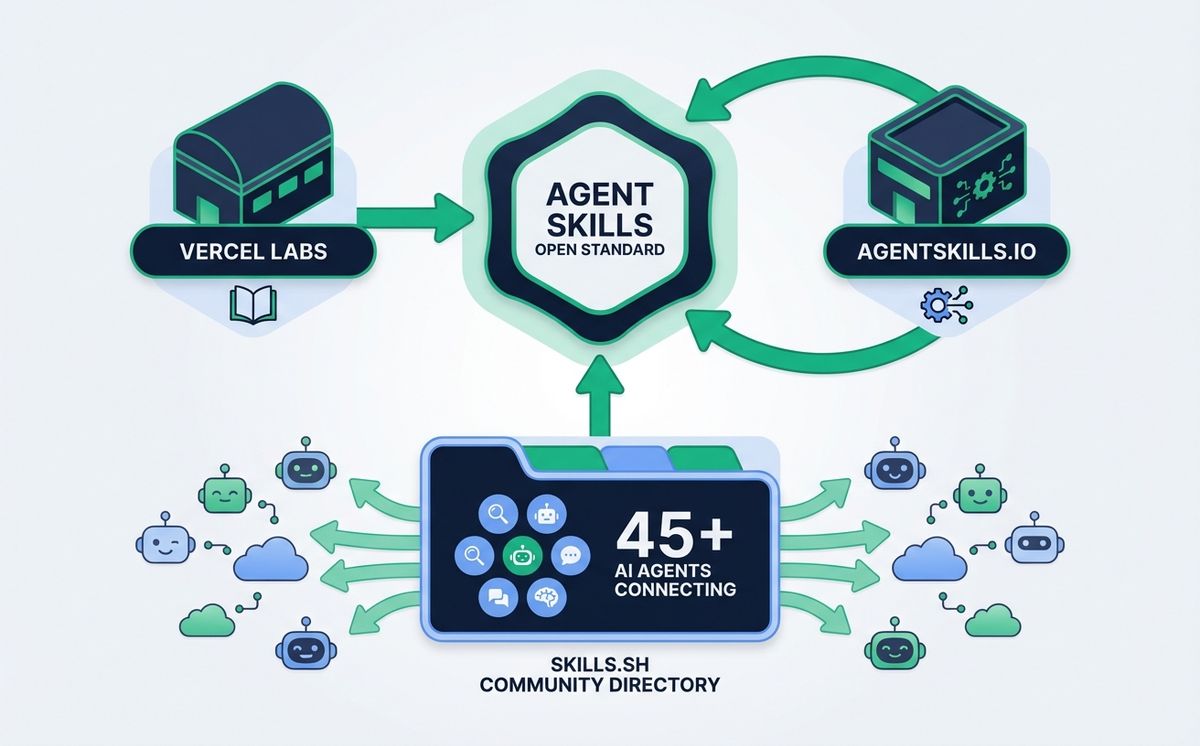
The format isn’t proprietary. It’s an open standard launched by Anthropic in October 2025 and adopted rapidly across the industry. The same SKILL.md structure works with over 45 agents: Claude Code, GitHub Copilot, Gemini CLI, Codex (OpenAI), Cursor, Windsurf, OpenCode, Cline, Goose, Roo Code, Augment, Antigravity, and many more. A brand voice skill written today for Claude Code works equally well for a developer who switches to Cursor next month — no modifications required.
The official agent skills documentation covers all available technical fields. What follows focuses on what business teams and technical leads need to know to start building their skills library. If you’d rather skip the setup entirely, LetBrand configures the whole system with you in a single session.
The Ecosystem: Vercel, agentskills.io, and 45+ Agents
Agent skills are an open standard — no single company owns the format, and an entire ecosystem has formed around it.
Vercel Labs plays the largest role outside of Anthropic. In January 2026, they launched the vercel-labs/skills CLI — now at 14,000+ GitHub stars. It installs and manages agent skills across all 45+ compatible tools with one command:
npx skills add vercel-labs/agent-skills
Their vercel-labs/agent-skills repository (25,000+ GitHub stars) includes official skills for React best practices, Next.js patterns, web design guidelines, accessibility, React Native, and Vercel deployments — all ready to install and use immediately. The Vercel agent skills guide documents the full ecosystem and is especially useful for teams already in the Vercel stack.
The skills.sh directory catalogs community skills with install metrics and popularity rankings. The agentskills.io website documents the open standard itself. A community-maintained repository has grown to over 232 agent skills covering code review, marketing, compliance, and more.
For teams, this cross-tool portability matters more than any individual feature. A brand voice skill you write once works in Claude Code for your content team, in GitHub Copilot for your developers, and in Gemini CLI for anyone who switches tools later. The investment doesn’t expire. Not sure which agent to start with? See our Claude vs ChatGPT comparison for work teams.
The convergence around a single open format also means the community does the maintenance work. Skills for React patterns, accessibility standards, and common API conventions are maintained by thousands of contributors. You benefit from that work without contributing to it.
Progressive Disclosure — Why This Architecture Matters
The natural question: if you have twenty skills, does the agent load them all at once and fill the context window?
No, because agent skills use a three-level architecture called Progressive Disclosure that loads only what’s needed, when it’s needed.
If you understand how an LLM works and the context window constraint, this architecture makes immediate sense.
Think of it like a well-organized reference manual. You don’t read the index, all six chapters, and every appendix every time you need a piece of information. You go to the index, find the relevant chapter, open it, and only if you need more detail do you go to the appendix. The rest of the manual doesn’t get in the way.
The three levels:
- Always in context: the names and descriptions of all your skills. A couple of lines per skill — near-zero cost. The agent always knows what skills exist.
- Only when relevant: the full content of the activated skill’s
SKILL.md. Loads when the agent detects the current task matches the skill’s description. - Only if needed: the additional files in the skill folder — examples, templates, scripts. Requested only if the agent needs them to complete the task.
A team with fifteen well-defined agent skills has that entire knowledge base available at a context cost equivalent to a few pages of text. The agent is not distracted by irrelevant information, and you’re not paying in tokens for context that is not useful right now.
Agent Skills in Practice: Use Cases for Teams
Most coverage of agent skills focuses on developer design systems — hex color codes, React components, typography. That’s the use case Anthropic demonstrated at launch. But for business teams of any size, the most valuable applications go much further.
| Skill | Contains | Result | Works with |
|---|---|---|---|
| brand-voice | Tone, examples, forbidden words | All content in the same voice without prior briefing | Claude Code, Copilot, Cursor |
| api-standards | Endpoints, response format, error handling | APIs without mixed patterns across developers | Claude Code, Gemini CLI, Codex |
| sales-process | Buyer journey, objections, key messages | Proposals aligned with the sales process | Claude Code |
| code-review | Checklist, standards, project anti-patterns | Consistent reviews across PRs and people | All agents |
| onboarding | Team standards, architectural decisions, Q&A | New hire productive from day one | All agents |
| client-reports | Template, tone, metrics to include | Consistent reports regardless of who generates them | Claude Code, Copilot |
For skills that include executable scripts — running tests, validating API schemas, checking accessibility — the natural next step is building full AI agents from scratch. But for most teams, instruction-only skills deliver the majority of the value with a fraction of the complexity.
Workspace Agency documented how their brand voice skill reduced blog production time from four hours to thirty minutes per post. Their sales skill generates outbound sequences in two minutes. Both results with the same team, no new hires. The skill encoded what they already knew; the agent applied it without being told twice.
The least-obvious use case is onboarding. When a new team member joins, agent skills with company standards make their output consistent from day one. It doesn’t depend on someone explaining how to work.
The way of working is in the skills. In a team where that process normally takes weeks to internalize, the difference is immediate.
If you want to build your company’s skills library — brand voice, sales process, code standards — LetBrand sets it up with you in a single working session. No AI expertise required from anyone on the team.
How to Create Your First Agent Skill
You don’t need to know how to program to create a useful skill.
1. Identify the patterns you repeat
Review your team’s last thirty AI sessions. Look for instructions that appear in more than half of them: the tone that always needs clarifying, the format that always needs specifying, the process that always needs explaining from scratch. Each of those patterns is a candidate for an agent skill.
2. Check the community first
Before creating from scratch, search what already exists. The npx skills find <query> command searches the community directory from the terminal. For common topics — React patterns, code review, accessibility, marketing copy — there is likely already a skill that covers most of what you need. Install it with npx skills add <owner/repo>.
3. Use skill-creator for custom skills
Claude Code includes a built-in skill called skill-creator that guides the process with questions: what task you want to automate, what instructions you usually provide, what examples you have. It generates a ready-to-use SKILL.md in under ten minutes. No technical knowledge required for instruction-based skills.
4. Decide where to install it
Three locations:
~/.claude/skills/— available across all your personal projects.claude/skills/within a repository — available only in that project- Enterprise level — available for all organization users
For a brand voice skill the whole team uses, the shared repository or enterprise option is correct.
5. Test it and iterate
Use it in real situations for a week. Note when the output needs correction: those corrections are improvements to add to the SKILL.md. Since Claude Code 2.1.0 (January 2026), skills support hot reloading — edit the file and changes apply without restarting the session.
6. Share via Git
A team skills repository, versioned like code, lets everyone work from the same updated base. When someone improves a skill, the pull request distributes it to the entire team. This is how individual knowledge becomes team infrastructure.
What NOT to put in a skill: context that changes frequently (that goes in project-level configuration files), data from specific projects — clients, tickets, conversations — and sensitive information like credentials or personal data.
The Real ROI of Agent Skills
The numbers are documented, not estimated.
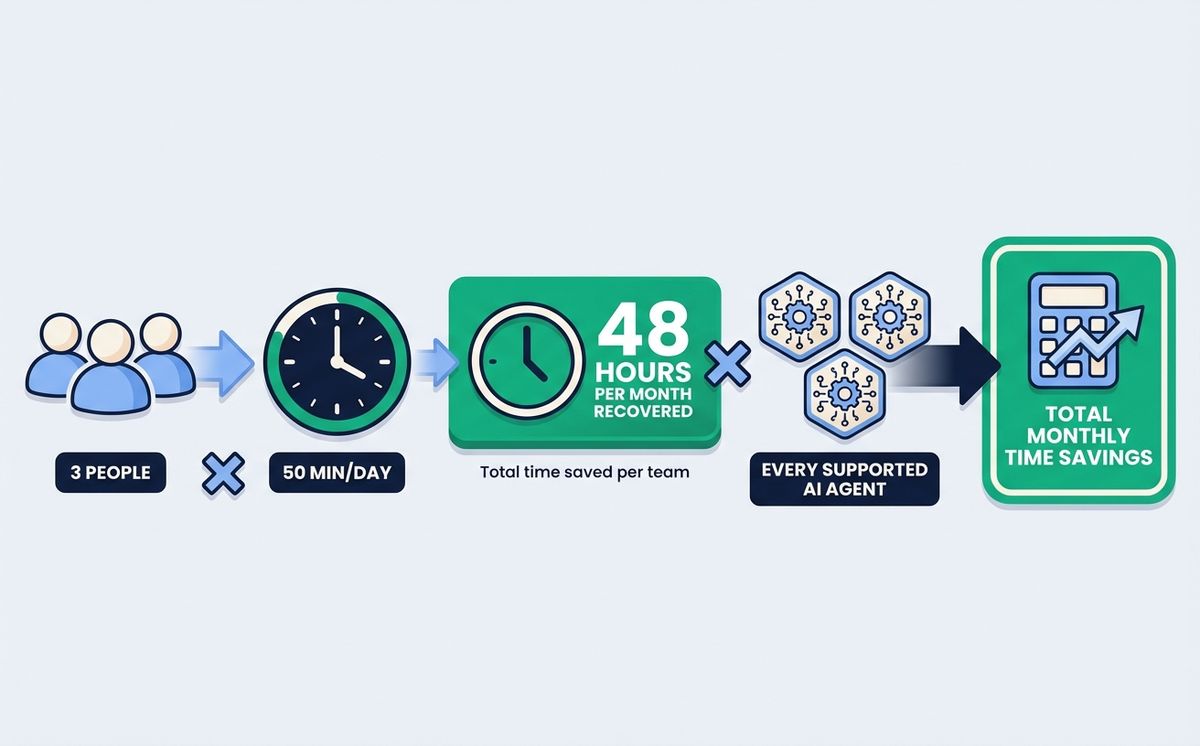
Gustavo Espíndola, whose October 2025 Medium article helped popularize agent skills, documented fifty minutes saved per day per developer on a SaaS team. Workspace Agency documented the reduction of blog production from four hours to thirty minutes — an eighty-seven percent reduction in time per post.
The more interesting calculation is per team, not per individual.
A developer who saves fifty minutes a day recovers four hours a week. A team of three recovers twelve hours a week — forty-eight hours a month. Not in optional tasks, but in time previously spent re-explaining context, correcting inconsistencies, and adjusting output that the agent generated without the project’s standards.
The cross-agent portability multiplier changes this math. A skill that works across Claude Code and GitHub Copilot doesn’t cost twice as much to maintain — it costs the same.
But the value extends to every agent on the team. Two people using different tools both benefit from the same brand voice skill. That compounding makes the investment more efficient the larger and more diverse the team’s toolset.
The effect is cumulative. Each new skill adds savings on top of previous ones. A team with five well-designed skills recovers more time than one with twenty mediocre ones, but the trend is always positive.
Agent Skills vs Other AI Context Methods
Agent skills don’t replace other ways to give AI context. Each serves a different purpose.
| Method | When loaded | Persistence | Portability |
|---|---|---|---|
| Agent Skills | Only when relevant | Always (while the skill exists) | Across projects, across tools |
| CLAUDE.md | Always (in that project) | Per project | Per project only |
| System prompt | Always (in that session) | Per session | Manual |
| In-prompt context | Always | Per message | Manual |
The practical rule:
- Agent Skills for reusable knowledge across projects: brand voice, code standards, sales processes
- CLAUDE.md for project-specific context: repo architecture, technical decisions, team conventions in that specific project
- System prompt for session-specific configurations that don’t justify a dedicated skill
- In-prompt context for information that varies per task — this article’s brief, this client’s data
The most effective approach combines them. Skills provide the transversal base that travels across projects and tools. CLAUDE.md adds the context specific to the current project. In-prompt context provides the variable data for each task.
Frequently Asked Questions About Agent Skills
Do agent skills only work with Claude Code?
No. Agent skills use an open standard that works with 45+ AI agents: GitHub Copilot, Gemini CLI, Codex (OpenAI), Cursor, Windsurf, OpenCode, Cline, Goose, Roo Code, Augment, and many more. A SKILL.md written for Claude Code works in any of these tools without modification. Claude Code is the most mature implementation and the recommended starting point, but the skills you build are not locked to it.
How many agent skills can I have active without saturating the context?
There’s no documented technical limit. The progressive disclosure architecture means only skill descriptions are always in context — a few lines per skill — and the full content loads only when the task is relevant. A team with twenty well-described agent skills doesn’t pay a significant context cost unless multiple skills activate in the same session.
Can I install agent skills others have already created?
Yes. The skills.sh directory catalogs community skills with install metrics. The npx skills find <query> command searches from the terminal.
Vercel Labs offers their official collection via npx skills add vercel-labs/agent-skills (React, Next.js, accessibility, Vercel deployments). There’s also a repository with over 232 skills covering code review, marketing, and compliance. Before creating from scratch, check what already exists.
What is the difference between agent skills and CLAUDE.md?
A CLAUDE.md is a project-specific context file that the agent reads at the start of every session in that directory — always, unconditionally. An agent skill is modular, portable across projects and tools, and loads only when the task is relevant. Skills are for reusable knowledge that travels with the team (brand voice, code standards, sales processes). CLAUDE.md is for the specific context of the current project — its architecture, technical decisions, team conventions.
Do I need to know how to program to create an agent skill?
Not for instruction skills, which cover most use cases. Claude Code includes the skill-creator skill that guides creation with questions — no technical knowledge required for brand voice, sales processes, or documentation standards. For executable skills that include scripts (linting, tests, validations), basic familiarity with scripts helps. But the majority of the value comes from instruction skills that anyone on the team can write and maintain.
Agent skills are not a niche feature for power users. They are the practical mechanism for turning what your team already knows into infrastructure that any AI agent applies automatically — every session, every tool, without being asked.
Three things you can do this week:
- Identify one pattern: review your recent AI sessions and find the instruction you repeat most. That’s your first skill.
- Check the community first: run
npx skills find <your topic>— there may already be a skill that covers most of what you need. - Share with the team: a shared skills repository converts individual habits into team standards that every agent on every tool applies consistently.
Teams that build their skills library now have an operational advantage that compounds over time. The cost of starting is one afternoon. The cost of not starting is paying the setup tax on every AI session indefinitely.
If you want to configure your team’s agent skills — brand voice, code standards, sales process — schedule a call with LetBrand. We set up the system in one working session. No AI expertise required from anyone on your team.
For more resources on integrating AI into your company’s processes, visit our AI Solutions section.
*Sources: Official Agent Skills Documentation — Anthropic — Vercel Agent Skills Guide — vercel-labs/agent-skills — vercel-labs/skills CLI — skills.sh directory — 232+ Agent Skills Repository — Agent Skills Open Standard — Gustavo Espíndola, Medium — Workspace Agency*
Related Posts

Every match weekend, Spain Cloudflare blocks take down online shops, payment systems and GPS apps. Pirates keep watching. Your business pays the bill.
Read more
How does an LLM work, explained without jargon: books, tokens, maps of connections, and millions of corrections. Real examples for SME owners.
Read moreReady to start your project?
Let's talk about how we can help your brand grow with a personalized digital strategy.
Contact us