
How to Build an AI Agent from Scratch: A 2026 Guide
 Adrian Sobota
What if your next software project could think, plan, and adapt on its own? The rise of autonomous AI agents represents one of the most significant shifts in

How to Build an AI Agent from Scratch: A 2026 Guide
Learning how to build an AI agent from scratch is quickly becoming one of the most valuable skills in modern software development. Unlike traditional chatbots that wait for instructions, AI agents perceive their environment, make decisions, and take independent action to achieve complex goals. Mastering how to build an AI agent from scratch gives you the power to create systems that automate workflows, solve multi-step problems, and deliver results that static models simply cannot match. According to MIT Sloan, agentic AI is already transforming how businesses operate, from customer service to software engineering. Whether you want to build AI agent Python solutions for data analysis or create autonomous AI agent systems for enterprise automation, this comprehensive guide walks you through every step of the process. By the end, you will understand the AI agent architecture explained in practical terms, compare leading frameworks, and deploy your first working agent.
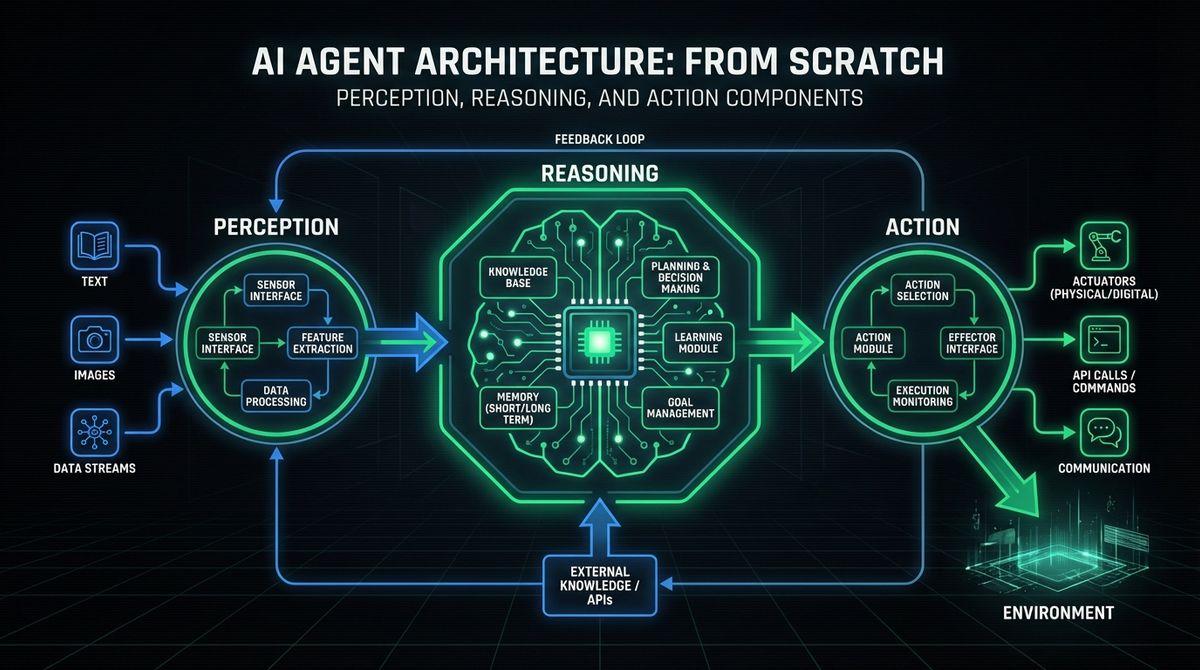
How to Build an AI Agent from Scratch: Understanding the Core Architecture
Before you start writing code to build an AI agent from scratch, make sure you have the right foundation: Python 3.10 or higher, a basic understanding of large language models, and an API key from at least one LLM provider (OpenAI, Anthropic, or Google). With those prerequisites in place, you need to understand what makes an AI agent fundamentally different from a standard LLM application. An AI agent operates through a continuous loop of three core components: perception, deliberation, and action. The perception layer ingests information from the environment, whether that means reading user messages, querying databases, or monitoring APIs. The deliberation layer, typically powered by a large language model, reasons about what to do next based on the available context and its defined objectives. The action layer executes decisions by calling tools, writing files, sending messages, or interacting with external services.
This architecture is often called a "ReAct loop" (Reasoning + Acting), and it is the foundation of virtually every modern agent framework. The key differentiator from a simple chatbot is that an agent operates in a loop: it reasons, acts, observes the result, and then reasons again until the task is complete. This iterative approach enables agents to handle complex, multi-step tasks that require adapting to new information along the way. If you are interested in exploring how AI-powered services can benefit your organization, understanding this architecture is the first step.
The simplest agent loop in pseudocode looks like this:
- Step 1. Receive the user goal.
- Step 2. Use the LLM to decide the next action or tool call.
- Step 3. Execute the chosen tool and collect the result.
- Step 4. Feed the result back to the LLM as new context.
- Step 5. Repeat until the LLM determines the goal is achieved.
This pattern scales from a simple research assistant to a fully autonomous agent that can manage deployments, analyze data, or orchestrate entire business workflows.
Step 1: Define Your Agent's Mission and Scope
The single most important decision when learning how to make an AI assistant or agent is clearly defining what it should accomplish. A vague goal like "help with tasks" leads to an unfocused agent that does nothing well. Instead, define a specific mission with measurable outcomes.
Ask yourself these questions:
- What problem does this agent solve? Example: "Automate weekly sales report generation from CRM data."
- What tools does it need? Example: CRM API access, a spreadsheet library, email sending capability.
- What are its boundaries? Example: It can read and analyze data, but it must not delete records or send emails without human approval.
- What does success look like? Example: A formatted report delivered to the team Slack channel every Monday at 9 AM.
Writing a clear scope document before coding prevents feature creep and ensures you build the right tools for your agent. This principle applies whether you are building a custom AI agent development project for a startup or an enterprise-scale system. Consider reviewing LetBrand's pricing options if you need professional guidance on scoping your AI agent project.
Step 2: Building the Agent Loop in Python
Now let us build an AI agent from scratch using Python. The following implementation creates a minimal but functional agent that can reason and use tools. This is the foundation you will extend in later steps.
First, define your tools as simple Python functions:
import json
import os
from openai import OpenAI
client = OpenAI(api_key=os.environ["OPENAI_API_KEY"])
def search_web(query: str) -> str:
    """Simulate a web search and return results."""
    return f"Search results for: {query}"
def calculate(expression: str) -> str:
    """Evaluate a mathematical expression safely."""
    try:
        result = eval(expression, {"__builtins__": {}})
        return str(result)
    except Exception as e:
        return f"Error: {e}"
tools = {
    "search_web": search_web,
    "calculate": calculate,
}
Next, define the tool schemas that the LLM will use to decide which tool to call:
tool_schemas = [
    {
        "type": "function",
        "function": {
            "name": "search_web",
            "description": "Search the web for information",
            "parameters": {
                "type": "object",
                "properties": {
                    "query": {"type": "string", "description": "The search query"}
                },
                "required": ["query"],
            },
        },
    },
    {
        "type": "function",
        "function": {
            "name": "calculate",
            "description": "Evaluate a mathematical expression",
            "parameters": {
                "type": "object",
                "properties": {
                    "expression": {"type": "string", "description": "Math expression to evaluate"}
                },
                "required": ["expression"],
            },
        },
    },
]
Finally, implement the agent loop:
def run_agent(user_goal: str, max_steps: int = 10) -> str:
    messages = [
        {"role": "system", "content": "You are a helpful agent. Use tools to accomplish the user's goal."},
        {"role": "user", "content": user_goal},
    ]
    for step in range(max_steps):
        response = client.chat.completions.create(
            model="gpt-4o",
            messages=messages,
            tools=tool_schemas,
        )
        choice = response.choices[0]
        if choice.finish_reason == "stop":
            return choice.message.content
        if choice.message.tool_calls:
            messages.append(choice.message)
            for tool_call in choice.message.tool_calls:
                fn_name = tool_call.function.name
                fn_args = json.loads(tool_call.function.arguments)
                result = toolsfn_name
                messages.append({
                    "role": "tool",
                    "tool_call_id": tool_call.id,
                    "content": result,
                })
    return "Agent reached maximum steps without completing the goal."
This loop is the core of every steps to build an AI bot. The LLM decides what to do, the code executes the action, and the result feeds back in. You can extend this pattern with more tools, better error handling, and persistent memory.
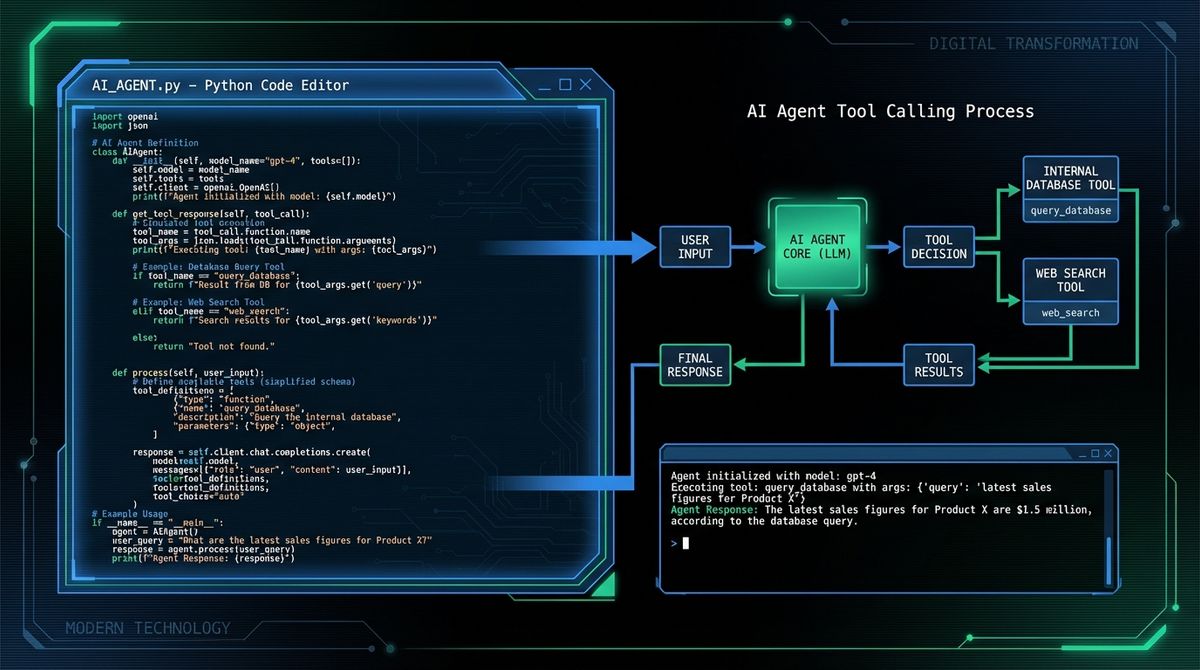
Step 3: AI Agent Framework Comparison
While building from scratch gives you maximum control, frameworks can accelerate development significantly. Here is an AI agent framework comparison of the most popular options in 2026:
- LangChain. The most mature ecosystem for building LLM applications. It provides agents, chains, memory management, and integrations with hundreds of tools and data sources. Best for developers who want a batteries-included approach. The LangChain AI agent tutorial documentation is extensive and well-maintained. However, LangChain can be overly abstracted for simple use cases, making debugging harder.
- OpenAI Agents SDK. A lightweight, production-ready framework from OpenAI for OpenAI agent development. It provides built-in tool calling, handoffs between agents, guardrails, and tracing. Best for teams already using OpenAI models who want a streamlined developer experience. It is simpler than LangChain but less flexible for multi-provider setups.
- Claude Code / Anthropic Agent SDK. Anthropic offers an agent SDK that emphasizes safety and reliability. The Claude API approach uses a tool-calling pattern similar to OpenAI but with stronger emphasis on harmlessness and instruction following.
- LlamaIndex. Focused on data retrieval and RAG (Retrieval Augmented Generation). Best when your agent needs to reason over large document collections. Less suited for general-purpose action agents.
- CrewAI / AutoGen. Multi-agent frameworks that enable teams of specialized agents to collaborate. Best for complex workflows where different agents handle different subtasks.
For most developers starting their first AI agent tutorial, we recommend beginning with a from-scratch implementation (as shown above) and then migrating to a framework once your requirements outgrow the simple loop. Visit the LetBrand blog for more comparisons and framework deep-dives.
Step 4: Adding Memory and Context Management
A stateless agent forgets everything between interactions. For real-world applications, you need memory. There are three types of memory commonly used in AI agents:
- Short-term memory (conversation context). The message history within a single session. This is what the agent loop above already provides. However, LLMs have limited context windows, so you need strategies for managing long conversations.
- Working memory (scratchpad). A temporary store where the agent can write notes, intermediate results, or plans. This is often implemented as a simple key-value store or a dedicated "thoughts" section in the system prompt.
- Long-term memory (persistent storage). Information that survives across sessions. This can be implemented using vector databases (Pinecone, ChromaDB, Weaviate) for semantic search over past interactions, or traditional databases for structured data.
Here is a practical approach to adding a simple memory system:
from collections import deque
class AgentMemory:
    def __init__(self, max_short_term: int = 50):
        self.short_term = deque(maxlen=max_short_term)
        self.long_term = []
    def add_message(self, role: str, content: str):
        self.short_term.append({"role": role, "content": content})
    def save_to_long_term(self, key: str, value: str):
        self.long_term.append({"key": key, "value": value})
    def search_long_term(self, query: str) -> list:
        return [item for item in self.long_term if query.lower() in item["value"].lower()]
For production systems, replace the simple list with a vector database to enable semantic similarity search. This allows the agent to recall relevant past interactions even when the exact keywords do not match.
Step 5: Tool Design and Integration Best Practices
The tools you give your agent define its capabilities. Poor tool design leads to confused agents that call wrong functions or fail to accomplish goals. As Forbes emphasizes, the quality of an agent is directly proportional to the quality of its tools.
Follow these principles when designing tools for your create autonomous AI agent project:
- Clear, descriptive names. Use `searchcompanydatabase` instead of `query_db`. The LLM uses the function name to decide which tool to call.
- Detailed descriptions. Explain what the tool does, when to use it, and what it returns. The description is part of the LLM prompt.
- Focused scope. Each tool should do one thing well. A tool that "searches the web AND sends an email" confuses the agent. Split it into two tools.
- Robust error handling. Return meaningful error messages instead of crashing. The agent can recover from errors if it understands what went wrong.
- Safe defaults. For destructive operations (deleting data, sending messages), require explicit confirmation or implement a dry-run mode.
If you are building tools that interact with sensitive systems, consider implementing human-in-the-loop approval for critical actions. This is especially important in enterprise environments. Contact our team to discuss best practices for building safe, production-ready agent tools.
Step 6: Testing, Evaluation, and Deployment
Testing an AI agent is fundamentally different from testing traditional software. Because LLM outputs are non-deterministic, you cannot rely solely on exact-match assertions. Instead, use a multi-layered testing approach:
- Unit tests for tools. Test each tool function independently with known inputs and expected outputs. This is standard software testing.
- Integration tests for the agent loop. Use mock LLM responses to verify that the agent correctly parses tool calls, executes them, and handles the results.
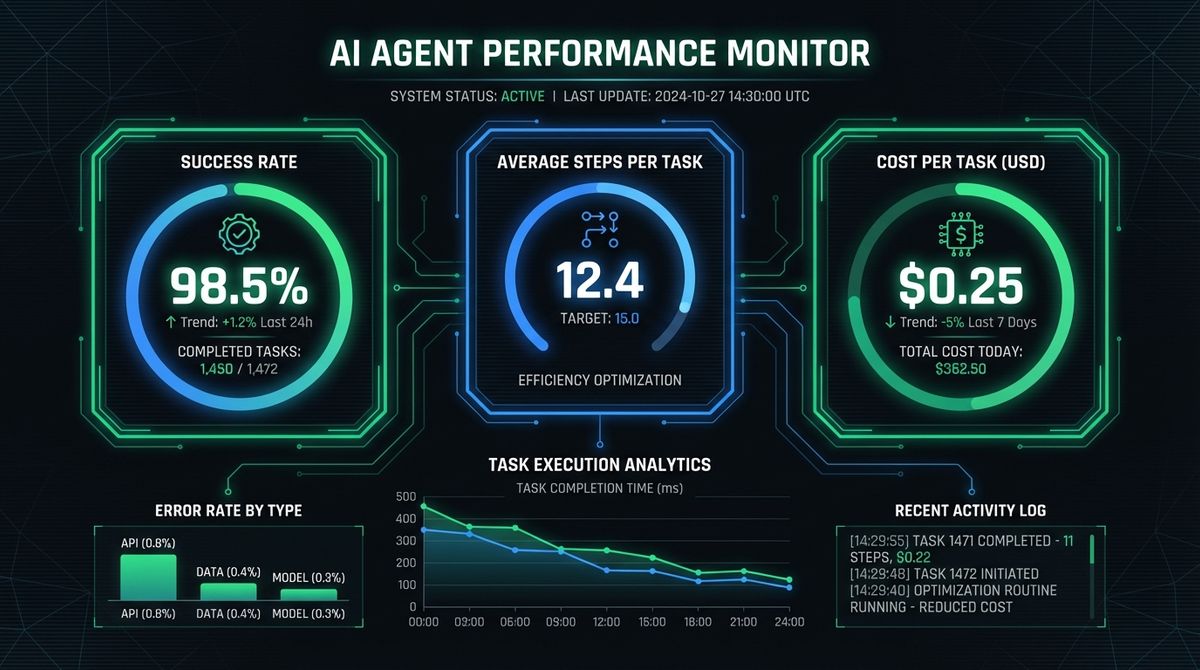
- Evaluation benchmarks. Create a set of tasks with known correct outcomes. Run the agent against these tasks multiple times and measure success rate, average steps to completion, and cost.
- Red teaming. Deliberately try to make the agent fail or behave unexpectedly. Test edge cases like ambiguous instructions, conflicting goals, and tool failures.
For deployment, consider these factors:
- Cost management. Each agent step involves an LLM API call. Set maximum step limits and implement cost tracking.
- Observability. Log every step of the agent loop: the LLM reasoning, tool calls, results, and final output. This is essential for debugging production issues.
- Rate limiting. Protect external APIs from excessive calls by implementing rate limits and caching.
- Graceful degradation. When tools fail or the LLM produces unexpected output, the agent should recover gracefully rather than crash.
A comprehensive guide from Zealousys details additional deployment patterns for production agents, including containerization and auto-scaling strategies.
Beyond the technical aspects of how to build an AI agent from scratch, responsible development demands attention to ethics. Users should always know they are interacting with an AI. Define hard limits on what the agent can do using allowlists. Ensure compliance with data privacy regulations (GDPR, CCPA) and always include human-in-the-loop mechanisms for high-stakes decisions. As DevCom's guide emphasizes, responsible development is a prerequisite for agents that earn user trust. Explore more industry insights on the LetBrand blog.
Conclusion: Your Path to Building Intelligent AI Agents
You now have a complete roadmap for how to build an AI agent from scratch. Starting with a clear understanding of the perception-deliberation-action architecture, you learned how to build an AI agent from scratch by defining a focused mission, implementing the core agent loop in Python, comparing and evaluating leading frameworks, adding memory systems for context persistence, designing effective tools, and deploying with proper testing and observability. The ethical dimension ensures your agents are not just powerful, but trustworthy.
The AI agent landscape is evolving rapidly. New frameworks, models, and deployment patterns emerge every month. The fundamental skills you have built here, understanding the agent loop, designing tools, and thinking about safety, will serve you regardless of which specific technologies dominate next year. Whether you are automating internal business processes, building customer-facing assistants, or creating development tools, these principles remain constant.
The best way to master agent development is to build something real. Start with a small, well-scoped project: a research assistant that summarizes articles, a monitoring agent that watches your infrastructure, or an automation bot that handles repetitive tasks. Use the from-scratch approach to understand the fundamentals, then graduate to a framework like LangChain or the OpenAI Agents SDK when your requirements demand it. The investment in understanding how to build an AI agent from scratch pays dividends as you tackle increasingly complex automation challenges.
Ready to take your AI agent development to the next level? Contact LetBrand for expert guidance on building production-grade AI agents tailored to your business needs, or explore our services to see how we can accelerate your AI journey.
Related Posts

Claude vs ChatGPT for work is not even close in 2026. Claude Code, Cowork, Office integration, and MCP make Claude the Swiss army knife for professionals.
Read more
If you have been anywhere near tech Twitter, Hacker News, or Reddit in the past two months, you have probably seen the lobster emoji. What is OpenClaw?
Read moreReady to start your project?
Let's talk about how we can help your brand grow with a personalized digital strategy.
Contact us